How do I register?
- Log in to your learning plan.
- Open “Attend the Mandatory Webinar.”
- Click the Zoom registration link.
- Select a session and submit the form.
After registering, you’ll receive a Zoom confirmation email and calendar invite from no-reply@zoom.us.

I registered but didn’t get the confirmation email or Zoom link.
- Click “Resend Confirmation” on the Zoom registration page.
- Check your Spam/Promotions folders.
- Confirm you entered the correct email address.
- Search your inbox for messages from no-reply@zoom.us.
If you still can’t find it, please submit your question through the Contact Us button. Our team will reply within 2–3 working days.

How do I reschedule?
- Open your Zoom confirmation email from no-reply@zoom.us and click “Edit” to pick a new time, or
- Re-register via the “Attend the Mandatory Webinar” module in your learning plan.
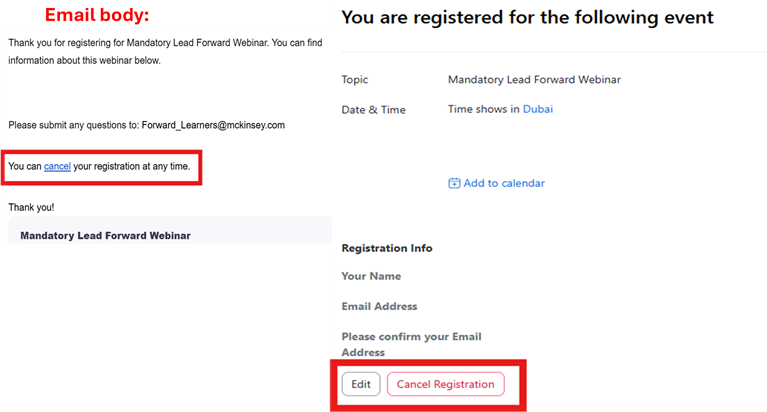
How do I cancel my registration?
Open your Zoom confirmation email from no-reply@zoom.us and click “Cancel.” The email includes step-by-step instructions.

I joined but wasn’t let in.
Please stay in the waiting room, admission can take up to 20 minutes.
I can’t find or complete the verification form.
The verification form only becomes available after the first Lead Forward webinar of your cohort has begun. You can confirm the date of that first session in the Zoom registration dropdown list (where all session times are shown).
If the form should be available but doesn’t load:
- Clear your cache.
- Try an incognito window.
- Switch devices or network.
If it still doesn’t work, please submit your question through the Contact Us button. Our team will support you within 2–3 working days.

I joined using a different email.
That’s okay. We’ll track attendance on our end, just make sure you complete the verification form.
My attendance isn’t showing as complete.
To be marked complete, you must:
- Attend the full webinar session, and
- Complete the verification form (available only after the first Lead Forward webinar of your cohort).
I can’t retake the verification form.
Reopen the verification form module and ensure you’re not on the review page.
- If you don’t see the “Retake” button, try resizing your screen.
.png?cq=50&mw=767&cpy=Center)
.png?cq=50&mw=1180&cpy=Center)